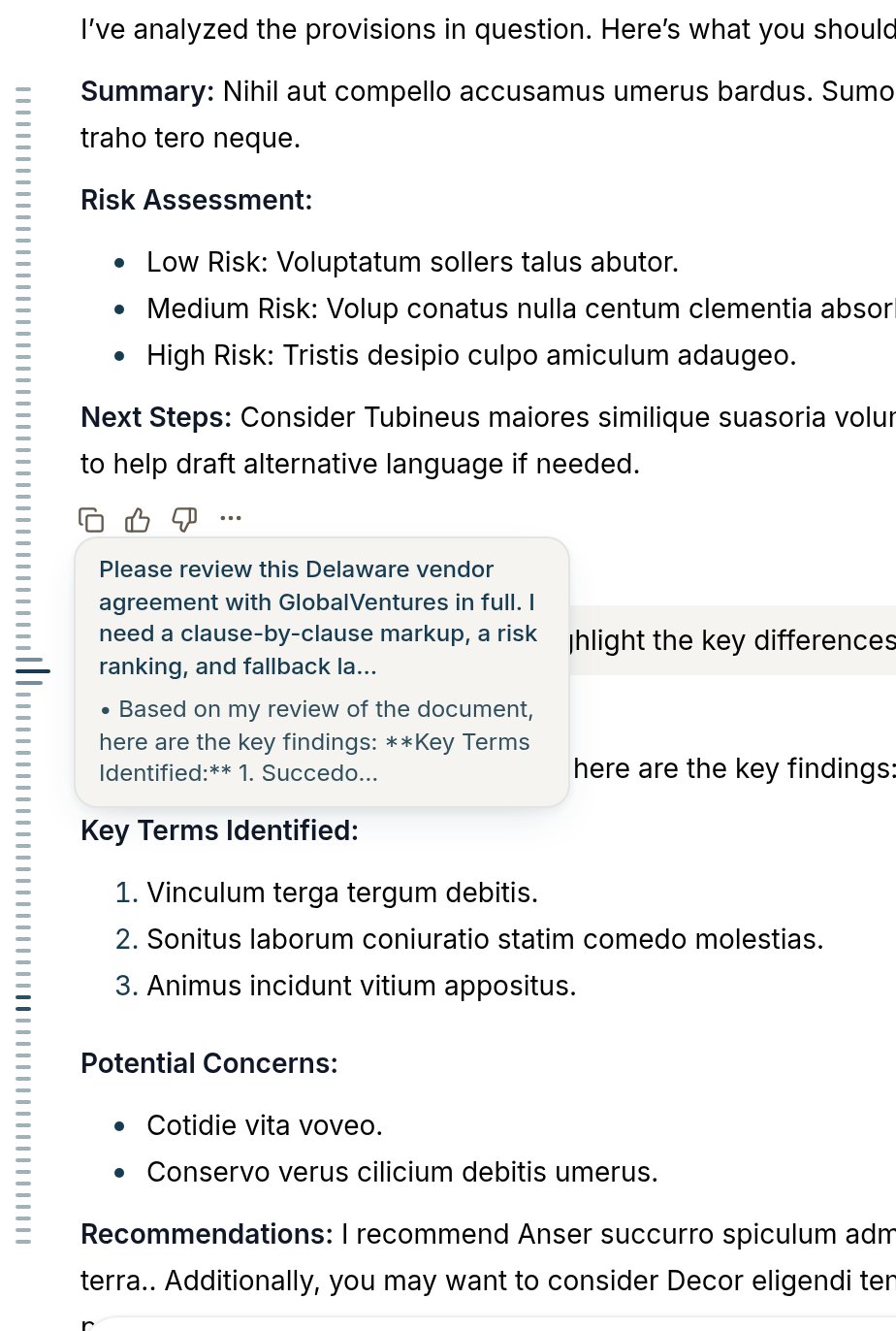
• A mini map for long chats: Chats now have a mini map down the left side, one tick per pair of messages. Hover over one of the ticks for a preview of that question and answer, and click to jump there.• Apply redlines from an automation: An automation that edits a document now leaves you tracked changes to read and apply, the same as an edit you asked for in chat.
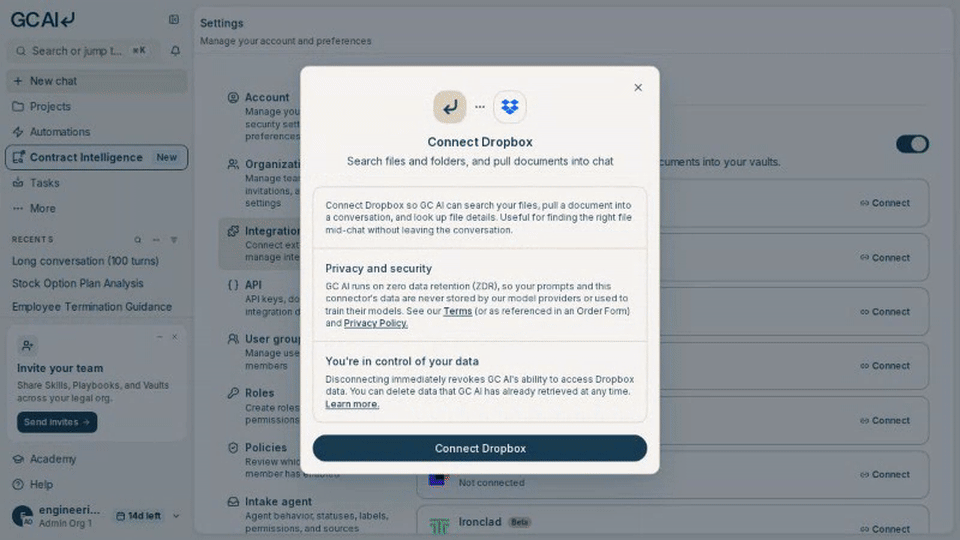
• Gmail labels and threads: After you connect Gmail, you can list mailbox labels, browse conversation threads, open a thread, and confirm which mailbox is connected. Sending mail still needs your approval.• Add a connector in one dialog: Agent connectors and document storage integrations now open one connect dialog. The first Connect button starts authorization, and anything the provider needs from you is collected in that same dialog.
• Manual columns and cell notes: Vault columns now come in two modes. Extracted columns are filled by GC AI from the document text, and Manual columns are yours to fill in by hand, so internal annotations like the reviewing attorney or a compliance status are included next to the extracted terms. You can also right-click any cell to leave a note for your team. A note never changes the cell’s value, and viewers can add notes too.• Chat answers point at the table: Vault chat can point at the specific rows and columns behind an answer, and an empty Vault chat suggests starter questions.• A starting View from setup: Vault setup now creates a starting View based on what you told it you want to track, instead of landing you on a bare table.• Filter by parties: Filter the View by several parties at once, or by the number of parties on an agreement.• Pick the right Google account: The add-source picker shows which Google account you are using and lets you switch it.• Confirm before removing a source: Deleting a document source now asks for confirmation.• Shared Dropbox folders: Add Dropbox Business team-space folders and shared folders that are not mounted to your personal Dropbox as Vault document sources. GC AI keeps those folders in sync with the same controls as other Dropbox sources.• GC AI checks your column instructions: When you add a Vault column or edit the instructions for the extraction, GC AI reads the instructions first and points out anything unclear, contradictory, or asking for too much at once, so you can reword it before the extraction is run.• Zoom a Word document in a Vault: Word previews now open as a fitted page with margins, page boundaries, and a zoom bar, the same way PDFs already do.• See which limit blocked your upload: Upload allowance, storage, and per-vault limits are separate caps. When an upload hits one, GC AI names the limit and shows the numbers behind it, so you know whether deleting documents will help.
• Share a project with edit access: Edit access is now enough to bring someone in, so you can add a teammate as a viewer or an editor without waiting on the owner. A project can also have more than one owner.
• Fixed an issue where the naming template editor appeared while you were still creating a Vault.• Fixed an issue where changes you had already applied could disappear when the editor rebuilt itself partway through a batch.• Fixed an issue where chat said pending edits would be applied when you downloaded the document, and the download gave you the unchanged file.• Fixed an issue where a later amendment’s effective date and signatories could replace the original agreement’s, even when that amendment changed unrelated terms.• Fixed an issue where Related Documents links pulled out of a document carried document markup along with them and led nowhere.• Fixed an issue where a sample review that finished in another session showed up in chat as an error.• Fixed an issue where chat confirmed a Vault column change that had not saved.• Fixed an issue where choosing Always send on a failure report told you the report was not being sent.• Fixed an issue where asking for a revised version of an attached contract could return a fresh document with strikethrough markers in the text instead of tracked changes on your file.• Fixed an issue where the sidebar jittered, collapsed on its own, or refused to stay expanded when GC AI was open in two windows of different widths.• Fixed an issue where Confirm was disabled on the final check in playbook review, so the review could not be finished.• Fixed an issue where Easy Edit offered to retry a revision on a paragraph that already carried tracked changes, an apply that could never succeed.• Fixed an issue where a revision card kept its own Apply button live through a batch apply, so a click could apply twice or out of order.• Fixed an issue where a revision was redrafted against a paragraph’s new text and applied with no sign the text had changed.• Fixed an issue where a new chat kept its placeholder name when the first attempt at a title failed.• Fixed an issue where deleting all the text out of a formatted block left the composer in that block instead of a plain paragraph.• Fixed an issue where a step interrupted before its details finished could stop the rest of the turn.• Fixed an issue where copying code or a Vault cell did nothing when the browser window was not focused.• Fixed an issue where Academy session details and enrollment controls were clipped on smaller screens.• Fixed an issue where printing the metrics dashboard squeezed the member table and cut off figures like hours saved.
Last modified on September 24, 2026
Was this page helpful?
Assistant
Responses are generated using AI and may contain mistakes.